
Why WordPress website development? In our current digital environment, businesses need a strong online presence to remain competitive and visible. From startups to multinational corporations, companies rely on modern websites to connect with customers, showcase services, and drive growth. Among the many platforms available, WordPress has emerged as one of the most trusted and versatile solutions for creating professional online experiences. Its flexibility, scalability, and user-friendly structure have made WordPress web development a preferred choice for organizations across industries.
WordPress powers a significant portion of the internet, proving its reliability and popularity among developers, designers, and business owners. One of the main reasons behind its widespread adoption is its simplicity. Even users with limited technical knowledge can manage content, update pages, and maintain their websites without requiring advanced coding skills. This accessibility allows businesses to focus more on their goals while reducing dependence on extensive technical support.

Another major advantage of WordPress web development is customization. Every business has unique objectives and branding requirements, and WordPress offers thousands of themes and plugins that make personalization easy. Whether a company needs an online portfolio, an e-commerce store, a corporate platform, or a blog, WordPress can adapt to different project needs efficiently. Developers can also create custom solutions tailored to specific business functions, ensuring that websites remain unique and engaging.
Search engine optimization plays a vital role in online success, and WordPress provides several features that support better visibility in search results. Clean code structures, mobile responsiveness, and SEO-friendly plugins help websites rank more effectively. Businesses can optimize page titles, meta descriptions, and content without difficulty, improving their chances of attracting organic traffic. Since search engines prioritize user experience and fast-loading pages, WordPress offers tools that contribute to better performance and enhanced accessibility.
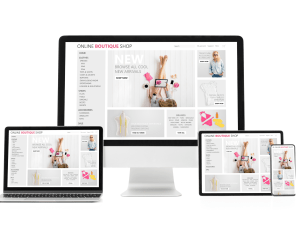
Mobile responsiveness has become essential as more users browse the internet through smartphones and tablets. Modern consumers expect websites to function seamlessly across all devices, regardless of screen size. WordPress themes are designed with responsive layouts, ensuring consistent performance and visual appeal on desktops, laptops, and mobile devices. This adaptability improves user engagement and reduces bounce rates, both of which are important for maintaining a successful digital presence.
Security is an important consideration in website development.
Cyber threats continue to evolve, making website protection a priority for businesses of all sizes. WordPress regularly releases updates to address vulnerabilities and improve system security. Additionally, developers can integrate advanced security plugins, firewalls, and authentication systems to strengthen protection. Routine maintenance and secure hosting practices further help businesses safeguard sensitive information and maintain user trust.

The growth of e-commerce has also contributed to the popularity of WordPress web development. Through plugins such as WooCommerce, businesses can transform standard websites into fully functional online stores. This integration allows companies to manage products, process payments, track orders, and handle customer interactions efficiently. With customizable shopping experiences and secure payment gateways, WordPress provides a reliable foundation for businesses aiming to expand their online sales operations.
Content management is another area where WordPress excels. Businesses frequently update blogs, service pages, announcements, and multimedia content to keep audiences informed and engaged. WordPress simplifies this process through an intuitive dashboard that allows users to publish and edit content quickly. This ease of management encourages consistent updates, which can positively impact audience retention and search engine rankings.
One of the key reasons businesses choose Liberation Technology for website development is its commitment to delivering modern, scalable, and user-focused digital solutions. The company emphasizes creating websites that are not only visually appealing but also optimized for performance, security, and long-term growth. By combining innovative design strategies with the latest technologies, Liberation Technology helps businesses build strong online identities that align with evolving market demands. Their focus on responsive design, search engine optimization, and seamless functionality ensures that clients receive websites capable of enhancing customer engagement and improving overall digital presence.

Website Development on WordPress in Brief: Quick Answers
- Why choose WordPress for website development? It is flexible, widely supported and lets you own your content, design and data.
- Who is it best for? Small businesses, agencies, publishers and stores that want to start simple and grow without replatforming.
- How long does a typical build take? A focused business site often takes a few weeks, depending on content readiness and the number of custom features.
- What drives cost? Design complexity, custom functionality, integrations, content creation and ongoing hosting and maintenance.
- What keeps a site healthy? Quality hosting, timely updates, backups, security scanning and regular performance checks.
Comparing Website Development Options
Before you commit, it helps to compare how the common routes to a new site differ. The table summarizes trade-offs for typical small-business needs.
| Option | Best for | Flexibility | Ownership | Watch out for |
|---|---|---|---|---|
| Custom WordPress build | Brands that need tailored design and features | Very high | You own files and data | Needs a capable developer and a maintenance plan |
| WordPress with a page builder | Teams that want to edit layouts themselves | High | You own files and data | Heavy layouts can slow pages if not optimized |
| Hosted site builder | Simple brochure sites | Limited | Platform controls hosting | Moving away later can mean rebuilding |
| Fully custom code | Unusual applications | Unlimited | You own the code | Highest cost and longest timeline |
For a deeper look at the trade-off between the two most common choices, read our comparison of WordPress vs a website builder.
An 8-Step Website Development Process
- Define goals. Decide what the site must achieve, such as leads, sales or bookings, and how you will measure it.
- Map the content. List the pages you need, then gather copy, photos and testimonials before design begins.
- Choose hosting and a domain. Match hosting to expected traffic. Our shared hosting suits new sites, while VPS hosting gives growing sites more headroom. See also our domain name guide.
- Design the structure. Sketch page layouts and navigation so visitors reach the important pages in two clicks.
- Build and configure. Install a lightweight theme, add only the plugins you need and set up forms and analytics.
- Optimize for search and speed. Write clear titles and descriptions, compress images and test on mobile.
- Secure and back up. Turn on SSL, multi-factor authentication for admins, malware scanning and automated backups.
- Launch, measure and improve. Watch behavior, fix friction points and publish helpful content on a schedule.
Speed, Search and Mobile in Website Development
Performance is part of quality. Visitors leave slow pages, and search engines take page experience into account. Google explains its measurements, called Core Web Vitals, on web.dev. Compress images, avoid stacking many plugins that do the same job and test every template on a phone. If your site already feels sluggish, our guide to why a WordPress site is slow lists the usual causes and fixes. Clear structure, descriptive headings and useful content also help search engines and AI assistants understand what each page is about.
Security Basics Every WordPress Site Needs
Popular platforms attract automated attacks, so basic hygiene matters. Keep WordPress core, themes and plugins updated. Remove anything you do not use. Use unique passwords and multi-factor authentication for every admin. The U.S. Cybersecurity and Infrastructure Security Agency has a plain guide to turning on multi-factor authentication. Add malware scanning with SiteLock and automated, restorable backups with CodeGuard, and consider security-focused WordPress hosting for higher-risk sites.
Common Mistakes in Website Development
- Starting with design instead of goals. A beautiful site that does not guide visitors to act rarely pays for itself.
- Installing too many plugins. Each one adds code, update work and potential risk.
- Skipping mobile testing. Most visitors arrive on phones, so check every page on a small screen.
- Neglecting maintenance. Unpatched software is a leading reason sites get compromised.
- Ignoring content quality. Thin pages weaken both trust and search visibility.
- Not planning for migration or growth. Choose hosting and structure that can scale rather than forcing a rebuild later.
Launch Checklist
- Goals, audience and calls to action are defined for each key page.
- Pages load quickly on mobile and desktop.
- Titles, descriptions and headings are written for every page.
- SSL, backups and malware scanning are active.
- Contact forms are tested and notifications reach the right inbox.
- Analytics track the actions that matter.
When to Bring in Professional Help
Many owners can launch a simple site alone, but professional help pays off when you need custom features, integrations, a store or a migration from another platform. A developer can also set up staging, performance tuning and security from day one, which prevents expensive fixes later. If you are unsure, our web development services can scope the work with you, and our guide on migrating WordPress yourself or hiring help explains when each route makes sense.
Frequently Asked Questions About Website Development
Is WordPress good for business website development?
Yes. It supports everything from simple brochure sites to stores and membership platforms, and its large ecosystem of themes, plugins and developers makes it easy to find help.
How much does website development cost?
Cost depends on scope. A template-based site costs much less than a custom design with integrations. Ask for a written scope so you can compare quotes fairly, and remember to budget for hosting and maintenance.
Do I need a developer, or can I build it myself?
You can build a simple site yourself with a theme and a page builder. Bring in a developer when you need custom features, complex integrations or a fast, secure setup without the learning curve.
How do I keep a WordPress site secure?
Update everything regularly, use strong passwords with multi-factor authentication, run malware scans and keep automated backups you have tested.
Will my site be fast enough?
Speed depends on hosting, images, plugins and theme choices. Test with real devices, follow the guidance on Core Web Vitals and fix the largest issues first.