
You can migrate WordPress yourself if your site is straightforward: a handful of pages, no store, and email hosted somewhere other than your web host. A migration plugin will do it in an afternoon. Hire help when payments, mailboxes on the same account, or custom server configuration are involved, because those are where mistakes get expensive.
Can I migrate my WordPress site myself is a question usually answered by people with something to sell, in both directions. The honest answer depends on four specific things about your site, and you can check all four in about five minutes.
Can I migrate my WordPress site myself?
For a lot of sites, yes. WordPress is portable by design. The whole site is files plus one database, and the tooling for moving both is mature. What people underestimate is not the copying, which is easy, but the sequencing around it: DNS, SSL and email all have to happen in the right order, and that is where DIY migrations come unstuck.
Run through this honestly:
| Question | DIY is fine | Get help |
|---|---|---|
| Does the site take payments? | No | Yes |
| Where does your business email live? | A separate provider | The same hosting account |
| Any custom server configuration? | None you know of | Custom cron, cache layers, non-standard PHP |
| What does half a day of downtime cost? | Not much | Real money |
| How big is the database? | Under a few hundred MB | Large, or plugin exports already fail |
Mostly in the left column, migrate WordPress yourself with confidence. Two or more in the right column, the cost of help is smaller than the cost of the likely mistake.
What is the easiest way to migrate WordPress to a new host?
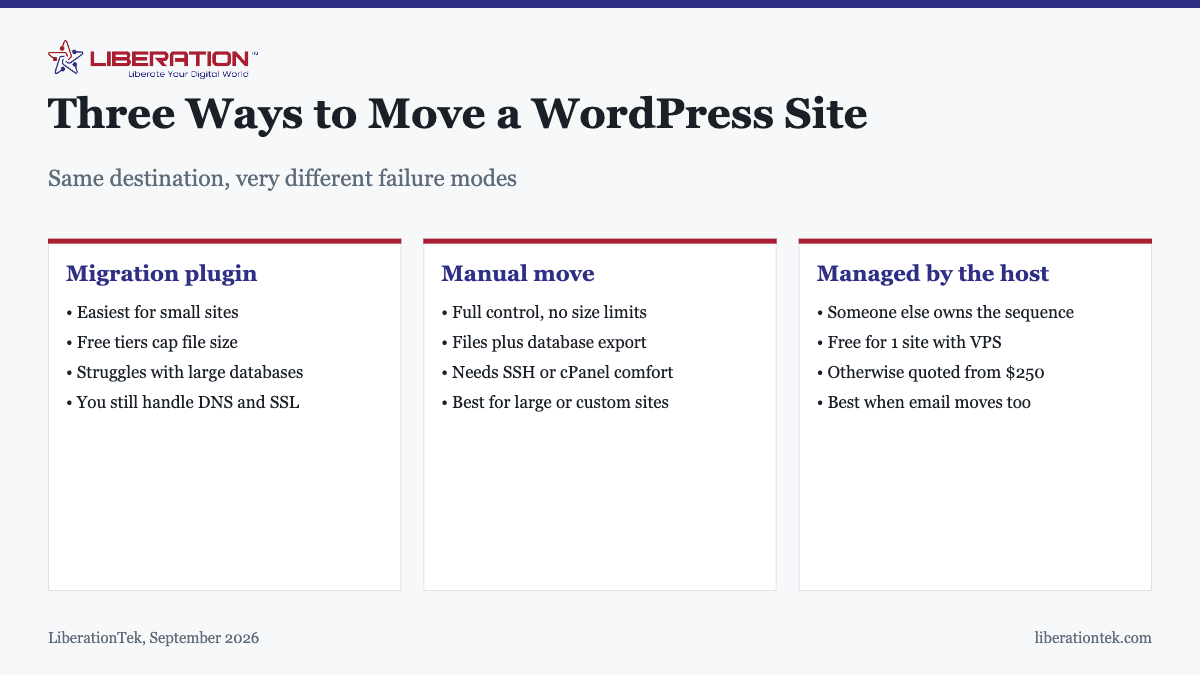
There are three routes, and “easiest” depends on which part of the job is hard for you.
A migration plugin
The standard DIY approach, and the reason most self-migrations succeed. Install the plugin on both ends, export the old site as a package, import it on the new host, then change DNS once you have tested. For a small site this genuinely is an afternoon.
Where plugins struggle: free tiers cap the export file size, large databases time out mid-import, and hosts with tight execution limits can kill the process halfway. A half-finished import is worse than no import, which is why the backup comes first.
A manual move
Copy the files, export the database, import it on the new server, update the database credentials in wp-config.php. No size limits and full control, but it assumes you are comfortable with cPanel or SSH and with phpMyAdmin. For large or heavily customized sites this is often the only route that works.
A managed migration
The new host moves it. This is easiest in the sense that matters most, because the difficult part of a migration is owning the sequence rather than copying the files, and this hands that ownership to someone who has done it before. LiberationTek includes a free migration of one site with managed VPS hosting and quotes other migrations from $250, covering more than 25 source platforms including GoDaddy, Squarespace and Wix.
If you do it yourself, the order that matters
Most DIY migration failures are sequencing failures, not technical ones. The order below is the one that avoids them:
- Back up files and database, and restore the backup once to confirm it works. Not optional.
- Export your DNS records before touching anything, especially MX records for email.
- Lower your DNS TTL to 300 seconds at least a day ahead.
- Set up WordPress on the new host and import files and database there.
- Test using a hosts file entry, so your machine sees the new server while everyone else still sees the old one. Check pages, forms, logins and outbound email.
- Sort out email first if mailboxes are moving. Mail lost in transit cannot be recovered.
- Change DNS, and leave the old host running.
- Confirm SSL on the live domain and that HTTP redirects to HTTPS.
- Keep the old hosting for 14 days before canceling.
The full version, including what to verify afterwards, is in the website migration checklist.
The mistakes that cost people the most
Changing DNS before testing
The single most common DIY error. Visitors land on a half-built site because the impulse after a successful import is to make it live immediately. Test first, always.
Forgetting email entirely
If your mailboxes sit on the same hosting account as the site, a DNS change moves mail delivery along with the website. Mail sent during a badly sequenced move bounces or disappears. This is the most expensive DIY mistake because it is the only one where the lost thing cannot be re-fetched.
Canceling the old host at cutover
Understandable, given you are probably migrating to stop paying them. Two weeks of overlap costs very little and covers stale DNS caches, forgotten subdomains and cron jobs you did not know existed.
Migrating and redesigning at once
If traffic drops you will have no idea which change caused it. Move first, stabilize, then redesign. We cover the ranking side in how to move without losing your rankings.
Moving from a closed platform is a different job
Everything above assumes WordPress to WordPress. Coming from Wix, Squarespace or a site builder is not a migration in the same sense, because there is no database to export and no files to copy. The content has to be rebuilt in WordPress, and what actually transfers is the text, the images and the URL structure. Plan it as a build with content carried over rather than a move, budget considerably more time than a host-to-host migration, and pay particular attention to mapping the old URLs to the new ones so the redirects are ready on launch day.
What hiring help actually buys
Not expertise you could not acquire. What you are buying is that someone else owns the sequence, has seen the failure modes before, and is responsible for rolling back if something goes wrong at 11pm. For a site that makes money, that is usually worth more than the fee.
Whoever does it, ask three questions before starting: does the quote include email migration, what is the rollback plan, and how long will the old site stay available. Vague answers to any of those are a reason to keep looking. Our process and what is included is described on the website transfer page, and the step-by-step is in how to move a site to a new host without downtime.
How to migrate WordPress yourself in four steps
If you decide to migrate WordPress yourself, keep the job small and ordered. The whole process comes down to four moves, and skipping the testing step is where most people get burned.
Start with a full backup of both the files and the database, and keep a copy somewhere other than the old host. The official WordPress developer guide to migrating explains the pieces involved. Next, copy everything to the new server and test the site on a temporary address before you change any DNS records. Only when pages, forms and logins all work should you point the domain at the new host.
- Write down every plugin, theme and PHP setting the site uses before you start.
- Lower the DNS time to live a day ahead so the switch takes effect quickly.
- Keep the old hosting account active for a week in case you need to roll back.
- Check email, since many sites send mail from the same host that you are leaving.
Our website migration checklist covers the same ground in more detail, and you can protect your search traffic with the advice in how to migrate a website without losing rankings.
When it makes sense to hire help instead of trying to migrate WordPress alone
You can migrate WordPress alone when the site is small, you have a recent backup, and a few hours of downtime would not hurt. Hiring help makes more sense when the site takes orders, runs memberships, or handles bookings, because mistakes there cost real money.
A hybrid approach works well for many owners. You make the plan and approve the result, and someone experienced handles the technical copy and the DNS switch. If you are moving to LiberationTek, free migration from another provider is part of the service, so you do not have to choose between doing it alone and paying a stranger. Read about how to migrate to Liberation to see how that works.
Whatever route you pick, decide in advance who owns each step. When you migrate WordPress with a helper, agree on the cutover time, who tests the site, and who holds the login details afterwards. Write those answers down. When you migrate WordPress on your own, set the same checkpoints for yourself, and do not change the domain until you have tested every form, checkout and login on the new server.
Questions to ask before you migrate WordPress
Before you migrate WordPress, ask how much downtime the business can accept and who will fix problems at midnight. If you plan to migrate WordPress during a busy season, pick a quiet weekend instead. If the answer to either question makes you nervous, bring in a professional. Many owners who first set out to migrate WordPress alone end up asking for help halfway through, and that is a sensible choice rather than a failure. The cost of a clean move is usually far smaller than the cost of lost orders.
You should also decide how you will migrate WordPress media files, since large uploads folders are the most common cause of timeouts. A good host will migrate WordPress sites of any size, but a slow upload from a home connection will not.
To migrate WordPress safely, treat the move as a small project with a start, a test and a finish. People who migrate WordPress with a written plan rarely lose data. Those who migrate WordPress in a hurry, late on a Friday, often do. A calm, tested approach to migrate WordPress is the most reliable way to avoid surprises.
Remember that you can migrate WordPress in stages. Some owners migrate WordPress content first, check it, and then move the remaining media. Whichever order you choose, a staged plan to migrate WordPress keeps each step small enough to verify.
Frequently asked questions
Can I migrate my WordPress site myself?
Yes, for most small sites. A migration plugin will move a straightforward WordPress site in an hour or two, and the skills required are closer to careful following of instructions than to development. Doing it yourself gets risky when the site sells things, when email lives on the same hosting account, or when the database is large enough that plugin exports start failing.
What is the easiest way to migrate WordPress to a new host?
For a small site, a migration plugin is the easiest route: install it on both ends, export from the old site, import to the new one, then change DNS once you have tested. For anything larger or more complex, a managed migration by the new host is easier in practice, because the hard part is sequencing DNS, SSL and email rather than copying files.
Should I hire someone to migrate my WordPress site?
Hire help if your site takes payments, if your email runs on the same hosting account, if you have custom server configuration, or if a few hours of downtime would cost you real money. Those are the cases where the failure modes are expensive. A simple brochure site with email hosted elsewhere is well within reach of a careful owner.
How much does it cost to have someone migrate my WordPress site?
LiberationTek includes a free migration of one site with VPS plans. Other migrations are quoted from $250 and cover more than 25 source platforms. Independent developers typically charge in a similar range for a straightforward WordPress move, with more for large or heavily customized sites.
Do WordPress migration plugins actually work?
They work well for small to medium sites and are the reason most DIY migrations succeed. They run into trouble with large databases, with free tiers that cap the export file size, and on hosts with restrictive execution limits that cause the import to time out halfway. When a plugin fails mid-import, the recovery is a manual migration anyway.
Will I lose content or email if I migrate WordPress myself?
Content loss is rare, because the database either transfers or it does not. Email is the real risk. If mailboxes live on the same hosting account as the site, changing DNS without moving them first can lose mail in transit, and unlike a web page, mail cannot be re-requested. Plan the mailboxes before you plan the files.
How long does a WordPress migration take?
A small site takes one to three hours of actual work, plus up to 48 hours for DNS to fully propagate. Larger sites take longer, mostly in testing rather than transfer. Budget an evening for a simple site and keep the old hosting for two weeks regardless of how smoothly it goes.