Email Deliverability
Email Deliverability: How to Reach the Inbox
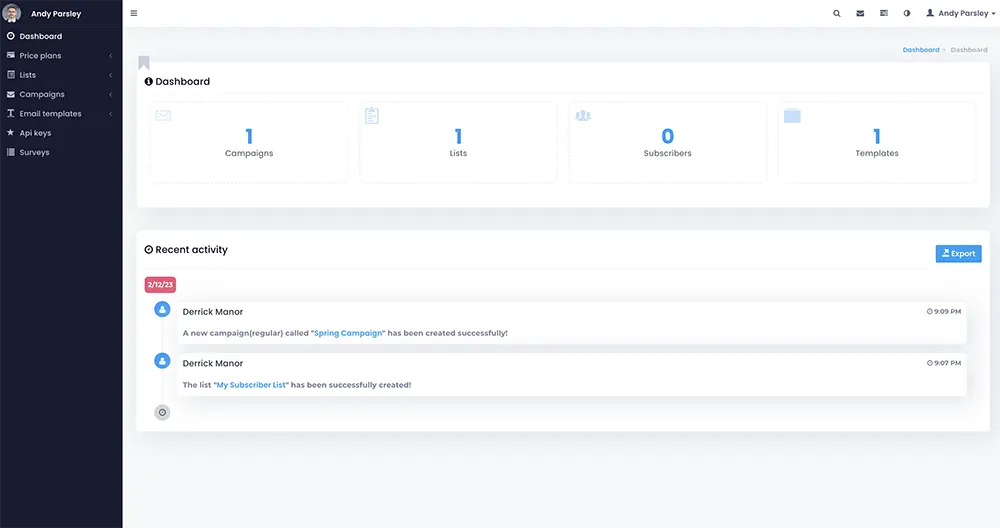
Email deliverability is the share of your messages that actually reach the inbox, as opposed to the spam folder or nowhere at all. It is mostly configuration, list quality and sending reputation, and most of it is under your control. This page explains how email deliverability works, what usually goes wrong, and which tools in Liberation Campaign, our email marketing platform, give you control over it.
Good email deliverability is also a business matter, not only a technical one: it decides whether invoices, quotes and campaigns are seen at all. We keep the explanations plain and the claims modest. Nobody outside a mailbox provider can promise where a message will land, so the aim here is to show you the factors that move the odds and how to check each one.
What email deliverability actually measures
People often confuse delivery with inbox placement. They are different outcomes, and it helps to separate them:
Delivered.
The receiving server accepted the message. It may still have gone to spam.
Bounced.
The receiving server refused it, either permanently (the address does not exist) or temporarily (the mailbox is full or the server is busy).
Inbox or spam.
Accepted mail is then sorted by the mailbox provider using signals about you as a sender and about the message itself.
Email deliverability covers the whole chain. A campaign with a 99 percent acceptance rate can still underperform if most of it is filed as spam, which is why open rates alone can mislead. Our guide to what a good open rate is explains how to read that number with care.
Why email goes to spam: common email deliverability issues
Mailbox providers decide where to put each message using signals about you as a sender. The usual causes of email deliverability issues are:
Missing or broken authentication.
The sending domain has no valid SPF, DKIM or DMARC records, or the records do not match the servers actually sending.
A damaged sending reputation.
Spam complaints, or a shared server where another sender misbehaves.
A dirty list.
Dead addresses and repeated bounces tell providers you are not careful.
Ignored unsubscribes.
Recipients who opted out and keep receiving mail will click the spam button.
Sudden volume changes.
A domain that sends a few hundred emails a month and then blasts a large list overnight looks unusual.
Content and formatting problems.
Broken links, one giant image with no text, misleading subject lines or missing plain-text content all count against a message.
Our guide Why Do My Emails Go to Spam? walks through diagnosis and fixes in more detail.
SPF, DKIM and DMARC in plain terms
These are three DNS records that let a receiving server check that your mail is really from you.
SPF
Lists which servers are allowed to send mail for your domain.
DKIM
Adds a digital signature to each message so the receiver can confirm it was not altered and that the domain vouches for it.
DMARC
Tells receivers what to do when SPF or DKIM checks fail, and where to send reports.
Two details trip people up. First, a domain can have only one SPF record, so every service that sends for you has to be combined into that single record. Second, DMARC works best when you start in a monitoring mode, read the reports to see who is sending as your domain, and only then tighten the policy. Jumping straight to a strict policy can block your own legitimate mail.
For a longer explanation, read What Are SPF, DKIM and DMARC? and the other guides in our business email hub. Authentication does not guarantee inbox placement, but sending without it makes spam placement much more likely.
Email deliverability tools in Liberation Campaign
Liberation Campaign gives you direct access to the infrastructure that decides whether mail arrives, rather than hiding it. Every plan includes these email deliverability tools:
Dedicated delivery servers.
Your sending reputation is yours and not affected by another sender on a shared platform.
SPF record generator.
It walks you through the DNS authentication mailbox providers check.
Bounce servers and feedback loop servers.
They process failed deliveries and spam complaints automatically.
Email box monitors.
They track what happens to campaigns after they leave.
Suppression and blacklist management.
Unsubscribes and complaints are honored permanently across every campaign and list.
Sending domains.
Mail goes out from your own domain, with unsubscribe handling built in.
We configure SPF, DKIM and DMARC on your domain at setup. If your mailboxes are on Liberation Email, we handle the DNS side for you. Plans are priced by emails sent, and the first 1,000 emails each month are free, so you can test the setup before you pay.
Email deliverability best practices
Step 1
Authenticate your domain. Set up SPF, DKIM and DMARC before your first campaign.
Step 2
Send from your own domain. Recipients and mailbox providers trust it more than a shared address.
Step 3
Keep the list clean. Remove bounces and honor unsubscribes immediately.
Step 4
Start small. Send a first campaign to a small segment to check placement before moving your whole list.
Step 5
Send at a sensible pace. See how often to send marketing emails.
Step 6
Watch the results. Review bounces, complaints and engagement after each send and fix problems before the next one.
Following email deliverability best practices is not exotic work. These email deliverability best practices are not exotic, and following them is the most reliable way to improve email deliverability without buying anything extra. Most email deliverability issues come from skipping one of the basics, usually authentication or list hygiene, and then sending to a large list all at once.
A pre-send checklist to improve email deliverability
Before any significant campaign, run through a short list. It takes ten minutes, helps improve email deliverability, and prevents most avoidable problems.
- Confirm the sending domain has valid SPF, DKIM and DMARC records and that they cover the platform you are sending from.
- Check that the From name and address are recognizable to your subscribers.
- Make sure the unsubscribe link is visible and works.
- Look at your list for addresses that bounced last time and remove them.
- Preview the message on a phone and in a plain-text view.
- Send a test to a small segment first and review the results before sending to everyone.
Whichever email deliverability tools you use, they work best on a clean list. If you are importing a list from another service, keep the unsubscribe and suppression history with it. Re-mailing people who already opted out is one of the fastest ways to create complaints.
Email deliverability: talk to an engineer.
Improve email deliverability with CampaignList quality: the part tools cannot fix
To improve email deliverability over the long run, list quality matters as much as configuration. Even the best configuration cannot rescue a poor list. Providers pay attention to how recipients respond: whether they open, click, delete without reading or report the message as spam. A smaller list of people who asked to hear from you will usually perform better than a larger one built from purchased or scraped addresses.
Collect consent clearly.
Say what people will receive and how often, at the point they sign up.
Remove inactive contacts.
People who have not engaged in a long time drag down your results. Try a re-engagement message and then let them go.
Never buy lists.
Purchased addresses produce bounces, complaints and sometimes spam traps.
For practical ways to grow a list the right way, see how to build an email list.
Keeping your sender reputation healthy
Reputation is built slowly and lost fast. Every send teaches mailbox providers whether your messages are wanted. The signals they weigh most are complaints, bounces and whether people engage with your mail. A few habits protect it:
- Only email people who asked to hear from you.
- Remove addresses that bounce instead of retrying forever.
- Make unsubscribing easy. A visible unsubscribe link prevents spam complaints.
- Increase volume gradually when you start a new sending domain.
- Keep different kinds of mail recognizable, so subscribers are not surprised by what arrives.
Among the email deliverability tools we offer, dedicated servers do the most here. Because Liberation Campaign uses dedicated delivery servers, the reputation you build is attached to your sending and not shared with unknown senders. That also means the responsibility sits with you, which is why the habits above matter.
What no provider can promise
No provider can promise inbox placement, and you should be skeptical of any that does. What a platform can do is give you the authentication, list hygiene and reputation controls that move the odds in your favor. Commercial senders in the U.S. must also follow the CAN-SPAM Act, which covers accurate headers, a physical postal address and a working opt-out; the FTC publishes a CAN-SPAM compliance guide for business that is worth a read.
Be wary too of anyone selling a one-time fix. Email deliverability is maintenance, not a purchase: authentication records change when you add a new sending service, and list health changes with every campaign.
Email deliverability for business email, not just campaigns
Marketing sends are only part of the picture. Invoices, quotes and one-to-one replies depend on the same authentication and reputation signals. If your business mailboxes sit on a domain with no SPF, DKIM or DMARC, even ordinary messages can land in spam. Email deliverability issues for everyday mail are usually the same ones campaigns face. That is why the DNS records matter as much for your everyday mail as for a newsletter.
Our business email guides cover setup on your own domain, and What Is a Professional Email Domain? explains why the domain half of your address determines who controls your mail. If you manage everything from one place, Hub for Teams bundles mailboxes with collaboration tools. Sending application or website mail through a proper sending service is covered on our SMTP relay page.
How to test email deliverability
You do not need special software to start. Look up your domain's SPF, DKIM and DMARC records in DNS and confirm they exist and cover your sender. Then send a first campaign to a small segment, including addresses at the big mailbox providers that you control, and check where the messages land. Treat any single test as a clue, not a verdict, because placement can differ by provider and by day. Our monitors then track how campaigns perform after sending, which is where ongoing email deliverability work happens.
What to prepare if you want help
If you would like us to review your setup or move your sending to Liberation Campaign, a few facts speed things up:
- The domain or domains you send from, and who manages their DNS.
- What you send: newsletters, promotions, receipts, notifications, or a mix.
- Roughly how many emails you send each month and how large your list is.
- Any symptoms you have seen, such as messages in spam, bounces, or recipients saying mail never arrived.
- Where your list currently lives, so we can plan the import. See migration services for done-for-you help.
Good email deliverability starts with knowing your own setup, so if you do not know some of these, that is fine. Ask us and we will help you find them.
Email Deliverability FAQs
What is email deliverability?
Email deliverability is how reliably your messages reach the recipient’s inbox instead of the spam folder or being rejected. It depends on domain authentication (SPF, DKIM, DMARC), your sending reputation, the quality of your list and how recipients respond to your mail.
Why do my emails go to spam?
Most often it is authentication: missing or misconfigured SPF, DKIM or DMARC. Other common causes are spam complaints, a list full of dead addresses, ignoring unsubscribes, or sharing a server with a sender who damages the reputation of the whole pool.
Can you guarantee my emails will reach the inbox?
No, and no honest provider can. Mailbox providers make the final decision. What we can do is configure SPF, DKIM and DMARC, handle bounces and complaints automatically, and give you dedicated delivery servers and monitoring so you control the factors you can.
What deliverability tools does Liberation Campaign include?
Every plan includes dedicated delivery servers, an SPF record generator, bounce servers, feedback loop servers, email box monitors, sending domains, and email blacklist and suppression lists. Plans are priced by emails sent, and the first 1,000 emails each month are free.
Is there a way to test my email deliverability?
Authentication records can be checked by looking up your domain’s DNS. We recommend importing your list, then sending a first campaign to a small segment to confirm placement and template rendering before you send to everyone. Our monitors then track how your campaigns perform after sending.
Our Promise Of Digital Independence
Liberating Your Digital World Is Our Passion
- U.S.A. owned and based
- We own and control our entire platform
- More security to protect your data
- No Censorship Guarantee
- 100% data ownership
- Your data is NEVER shared
Liberation News




LTS News

Global Edge Network
Liberation’s global edge network provides enhanced performance & security.
Freedom Tech News
Stay informed on the latest tech news, new products, promotions, & more!